Updated
Beauty scores
Rate my face: eight scores out of 100
Beautify is an iPhone app that rates your face from a single selfie. You get eight scores out of 100 (overall, potential, skin quality, facial symmetry, eyes, nose, lips and cheekbones), along with your face shape, eye shape and skin type and a glow-up guide to act on.

4.4 ★ from 1,100+ App Store ratings
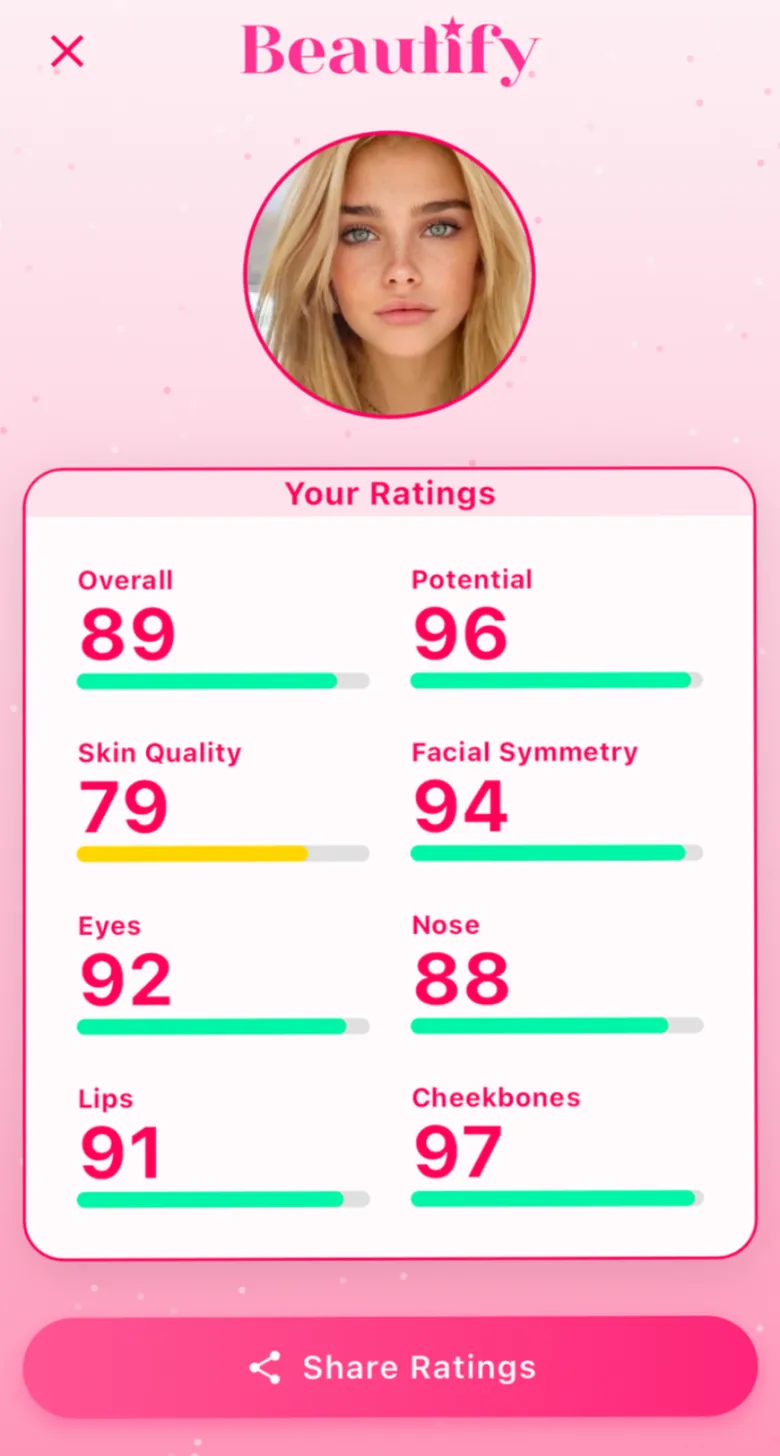
The eight scores
What Beautify scores
- Overall
- The headline number for your look as a whole.
- Potential
- Where your look could get to with your glow-up guide.
- Skin quality
- How clear and even your skin looks in the photo.
- Facial symmetry
- How closely the two sides of your face mirror each other.
- Eyes
- Your eye area as a feature.
- Nose
- Your nose as a feature.
- Lips
- Your lips as a feature.
- Cheekbones
- Your cheekbones as a feature.
Your Ratings
- Overall
- 89
- Potential
- 96
- Skin quality
- 79
- Facial symmetry
- 94
- Eyes
- 92
- Nose
- 88
- Lips
- 91
- Cheekbones
- 97
Selfie checklist
- Face straight and centered
- Look directly at the camera
- Mouth naturally closed
- Good, even light with no harsh shadows
- Nothing covering your face: hair back, no glasses or hat
- No filters or beauty mode, phone at eye level
How does Beautify rate your face?
You take a selfie or upload one, and Beautify analyzes it and returns three pages of results. Your Ratings shows the eight scores, Your Characteristics shows your face shape, eye shape and skin type, and the Glow Up Guide turns it into steps for skincare, hair, fitness, sleep and nutrition.
Every score sits on the same 0 to 100 scale with a colored bar, so you can see at a glance which features are your strongest and where the guide can help most.
What do the eight scores mean?
Overall is the headline number for your look as a whole. Potential looks ahead: it is the score for where your look could get to with the glow-up guide. Skin quality reflects how clear and even your skin looks in the photo. Facial symmetry reflects how closely the two sides of your face mirror each other. Eyes, nose, lips and cheekbones each get their own score, so you can see your standout features.
How do you get a consistent result?
Use the same kind of photo every time: face straight and centered, looking directly at the camera, mouth naturally closed, good even light without harsh shadows, and nothing covering your face, such as hair, glasses or a hat. Skip filters and beauty modes, and hold the phone at eye level, because angle, lens distance and lighting all change how a face looks in a photo.
Is a face rating the same as how attractive you are?
No. A beauty score is an estimate from one photo, and photos change with light, angle and expression. Attraction also depends on things no photo shows, such as voice, expression and personality, and beauty standards differ between people and cultures. Treat your scores as a fun starting point and a way to spot what you want to work on, not as a verdict on your worth.
Can you rate your face for free?
Beautify is free to download and the scan is free to take, but seeing your results needs Beautify Premium, a weekly subscription. The pricing page explains what is included.
Questions
Questions people ask
Is there an app that rates your face?
Yes. Beautify for iPhone rates your face from a selfie with eight scores out of 100: overall, potential, skin quality, facial symmetry, eyes, nose, lips and cheekbones. It also shows your face shape, eye shape and skin type.
How do I rate my face out of 100?
Take a straight-on selfie in good, even light with your hair off your face, then run it through a face rating app like Beautify, which scores your face and individual features out of 100.
What is a potential score?
In Beautify, Potential is the score for where your look could get to if you follow your glow-up guide. It sits next to your current Overall score.
Does Beautify work for men?
Yes. The analysis works on any face. The glow-up guide covers skincare, hair, fitness, sleep and nutrition for everyone, while the makeup tutorials are written mainly for people who wear makeup.
What happens to my selfie?
Your photo is used for the analysis and stored with your scan so you can look back at past results. You can delete scans or your whole account in the app. The privacy policy has the details.
See your eight scores
One selfie. Your scores, your face shape and your glow-up guide, on iPhone.
4.4 ★ from 1,100+ ratings on the App Store